You Know the Answer Is in That Video Somewhere. Video Recall Takes You Straight There.
You saved a 2-hour system design talk three weeks ago. You remember someone in a meeting mentioned a specific approach to database sharding and you know — you're almost certain — that talk covered it somewhere around the middle.
You open the video. You scrub forward to 45 minutes. Not there. You try 58 minutes. Getting closer. You spend 12 minutes of a 15-minute meeting break trying to find a 90-second segment.
That time is gone. And this will happen again with the next long video you save.
The problem with unsearchable video content
Text is scannable. Video is not.
You can skim a 40-page PDF in a few minutes. You cannot skim a 45-minute talk. The information density might be identical, but the format makes one navigable and the other opaque.
This creates a specific frustration with saved video content:
- You remember the concept was covered, but not when
- The video's own chapter markers (if they exist) don't match the granularity you need
- Scrubbing is imprecise and time-consuming — and you often overshoot and have to back up
- The longer the video, the worse the problem
Most read-later tools treat videos the same as links — they store the URL and leave you to navigate the content exactly as it is on YouTube. A 2-hour conference talk has no more structure in your library than a 3-minute clip.
What Video Recall does
When you save a YouTube video, SaveForLater.ai doesn't just store the link — it analyzes the full transcript and identifies the conceptually important moments.
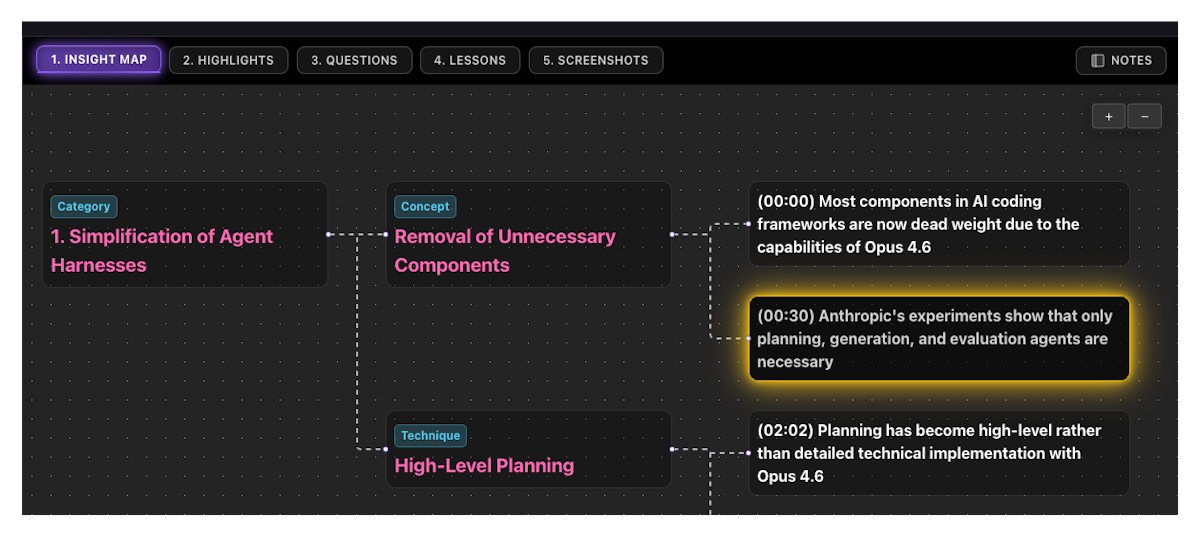
The result is an AI-generated table of contents for each video: timestamped segments where new concepts are introduced, key examples are given, or important conclusions are drawn. Each timestamp comes with a description of what's covered in that segment.
This isn't based on chapter markers or video descriptions. The AI reads the transcript and understands context — it knows the difference between a passing mention of "microservices" and a deep dive into microservice architecture patterns. Only the substantive moments are surfaced.
Click any timestamp → jump directly to that exact moment in the video. No scrubbing.
How to use Video Recall
- Save any YouTube video to SaveForLater.ai
- Open the content item — AI-generated timestamps are available immediately
- Scan the timestamped segments and their descriptions
- Click the timestamp for the segment you need
- Watch from that point — no scrubbing, no guessing
Video Recall also compounds across collections. Videos organized into focused Spaces generate more precise timestamps because the AI understands the thematic context of what you're trying to learn.
Video Recall alongside Insight Map and Highlight Cards
All three features work together for saved video content:
- Video Recall — timestamped navigation: jump to the moment
- Insight Map — structural overview: see how all the concepts connect across the whole video
- Highlight Cards — extracted insights: the key points, timestamped and organized by topic
Use Video Recall when you need to go back to a specific moment. Use Insight Map and Highlight Cards when you want to review what the video covered without re-watching it.
Who uses Video Recall
Researchers and engineers who save technical conference talks, architecture deep-dives, and tutorial series. When a concept comes up in their work, Video Recall lets them surface the relevant segment in seconds instead of scrubbing through hours of saved content.
Students working through lecture recordings and tutorial series. Timestamped key moments mean they can navigate a 2-hour lecture the same way they'd navigate a well-indexed textbook.
Knowledge workers building libraries of talks, interviews, and explainer videos. Over time, their saved video collection becomes a searchable knowledge base — not a backlog of links they'll never have time to re-watch.
Frequently Asked Questions
What video platforms does Video Recall support?
YouTube. Video Recall processes YouTube transcripts when content is saved. Other video platforms are not currently supported.
Does it work on videos without closed captions?
Video Recall relies on transcript content. Videos with auto-generated captions from YouTube will work. Videos with no captions or transcript may produce fewer or less precise timestamps.
How is this different from YouTube chapters?
YouTube chapters are set manually by the video creator and reflect their intended structure. Video Recall analyzes the actual transcript and identifies conceptually important moments — regardless of whether the creator added chapters. It produces finer-grained, concept-aware timestamps.
Can I add my own timestamps or notes to specific moments?
Use the Notes feature to add text notes to the content item. Pinned comments can also be attached to specific Insight Map nodes that correspond to video moments.
Does Video Recall work on short videos?
Yes, though shorter videos have fewer distinct moments to surface. Video Recall is most impactful for content over 20 minutes where scrubbing is genuinely costly.
Are timestamps generated immediately after saving?
Yes. Transcript analysis runs in the background immediately on save. For most videos, timestamps are ready by the time you open the content item.
The bottom line
Video content is only as useful as your ability to navigate it. Video Recall turns every saved YouTube video into a navigable, timestamped knowledge asset — so the answer you know is in there somewhere is a click away, not a scrubbing session away.
Save the video. Navigate it like a document.
Try Video Recall in SaveForLater.ai →
Related: Insight Map · Highlight Cards · Focus Mode