Not All Insights Are Equal. Signal Marking Teaches SaveForLater.ai Which Ones Matter to You.
Two people read the same article on team management. One is a senior engineer learning to lead for the first time. The other has been managing for ten years and found nothing new in it.
Same content. Completely different value. The insights that changed how one person thinks were obvious to the other.
AI extraction is objective. Your learning is personal. Signal Marking is how you make the difference explicit.
The problem with treating all insights equally
AI extraction is good at identifying what's noteworthy in a piece of content. It's not good at knowing which of those things matters to you, in your current context, for your specific goals.
Without a way to record personal relevance:
- High-value insights get buried in the same list as things you already knew
- You can't distinguish "I understood this" from "this changed how I think"
- Your library treats a career-defining insight the same as a piece of trivia
- Over time, the system has no way to learn what to surface for you specifically
This creates a flat library — everything treated equally, nothing prioritized by the person doing the learning. It accumulates information without developing signal.
What Signal Marking does
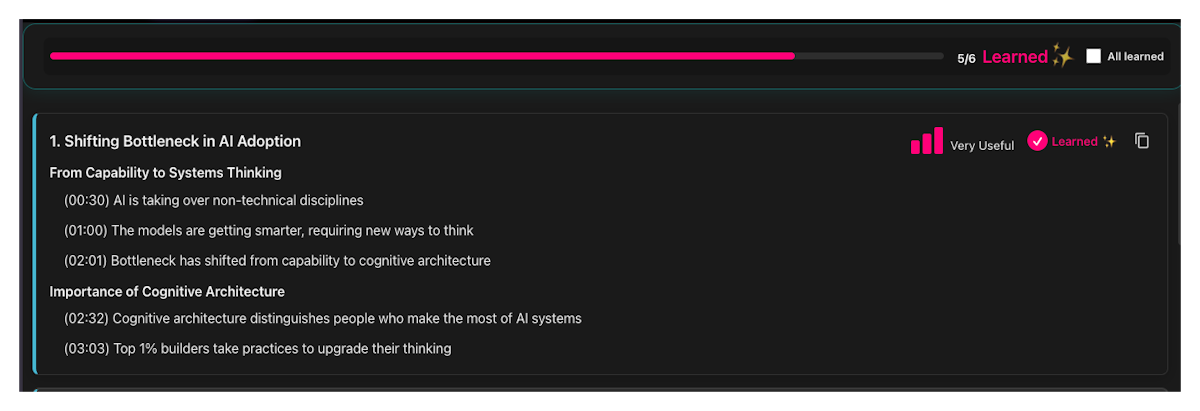
Signal Marking lets you rate each insight in your Highlight Cards by personal relevance — one click per insight:
| Level | What it means |
|---|---|
| Not useful | Doesn't apply to you or your current context |
| Useful | Worth knowing — relevant and informative |
| Very useful | High value — changes how you think or directly applies to your work |
This is not an objective quality rating. It's a personal relevance marker. The same insight might be "Not useful" for someone who already knows it and "Very useful" for someone encountering it for the first time. You're recording what it means to you — not evaluating the content.
Signal vs. Learned — these are distinct markers that work together:
- Learned = "I've processed this" — tracks completion
- Signal = "This matters to me" — tracks personal importance
You can learn something without finding it relevant (you understood it, it just didn't apply). You can mark something as very high signal before you've fully absorbed it (flagged as critical, not yet internalized). Together, they give a complete picture of your relationship with each insight.
Over time, every signal you mark is a data point. Patterns emerge: the types of insights you consistently find very useful, the topics where you find the most signal, the content formats that resonate most with how you think. These patterns build a signal memory — a learned understanding of what to surface for you.
How to use Signal Marking
- Open any saved content item and go to the HIGHLIGHTS tab
- Find the signal bar icon on the right side of each insight section
- Click to set the signal level: Not useful / Useful / Very useful
- Work through your saves consistently — the signal memory compounds with use
Signal Marking alongside Highlight Cards and Learning Metrics
Highlight Cards is where Signal Marking lives — the signal bar is on each insight section in the Highlights tab. Learning Metrics shows the aggregate of your Learned progress; signal data builds the personalization layer on top of that.
The more consistently you mark signal, the better SaveForLater.ai understands what to surface when you're deep in a learning session or looking for a specific insight you know you found valuable.
Who uses Signal Marking
Knowledge workers building domain expertise over time. Signal Marking creates a personal index of high-value insights — so when a topic comes up in a meeting or project, the "Very useful" insights are already identified and ready to retrieve.
Lifelong learners who consume broadly and want to distinguish what genuinely moved their thinking from what was interesting noise. Signal Marking creates the separation automatically, without creating a separate curation system.
Students who want to focus review time on the highest-value material. Marking signal on Highlight Cards creates a natural review deck weighted toward what matters most to them personally.
Frequently Asked Questions
Does signal rating affect what appears in my Learning Queue or Focus sessions? Signal data builds toward personalization over time. As you mark more signal, SaveForLater.ai learns your patterns and can surface higher-signal content more prominently.
Can I change a signal rating after I've set it? Yes. Click the signal bar again to change the level. Your understanding of an insight can evolve — your signal rating should too.
What if I don't rate something? Is it treated as "Not useful"? No. Unrated insights have "No signal" — a blank slate, not a negative rating. Signal Marking only records what you explicitly tell it.
Is signal marking required to use Highlight Cards? No. You can use Highlight Cards and the Learned tracking entirely without setting signal levels. Signal Marking is an optional personalization layer on top.
Do signal ratings carry over between content items? Signal ratings are per-insight within each content item. The patterns they form over time inform the broader signal memory — but each rating lives with its specific insight.
How many insights should I rate per session? As many as feel natural. Even rating the clearly "Very useful" and clearly "Not useful" items — and leaving the middle ones unrated — builds meaningful signal over time. Don't aim for 100% coverage; aim for consistency.
The bottom line
Your learning isn't generic. What matters to you depends on who you are, where you are in your expertise, and what you're working on right now. Signal Marking is how you encode that — one insight at a time — until your library actually knows you.
Start building your signal memory →
Related: Highlight Cards · Learning Metrics · Key Lessons