Stop Re-Watching. Use Insight Map to Get the Structure of Any Video, Article, or PDF Instantly.
You saved a 90-minute YouTube lecture six months ago. You remember it had a key framework somewhere in the middle — but you can't remember when. So you open it, scrub around, get frustrated, and give up.
That's not a memory problem. That's a structure problem. The content was never organized for retrieval — it was organized for first-time consumption.
Insight Map fixes this.
The problem with saved content
Most read-later tools treat saving as the finish line. They store your content, maybe summarize it, and leave you to deal with the rest.
But retrieval is where the real work happens. When you go back to something you saved:
- You don't want to re-read 40 pages. You want to find that one section.
- You don't want to re-watch an hour of video. You want that specific moment at 34 minutes.
- You don't want to skim an article again. You want the exact quote that supported your point.
The gap between "I saved this" and "I can actually use this" is a structure gap. No map, no navigation.
What Insight Map does
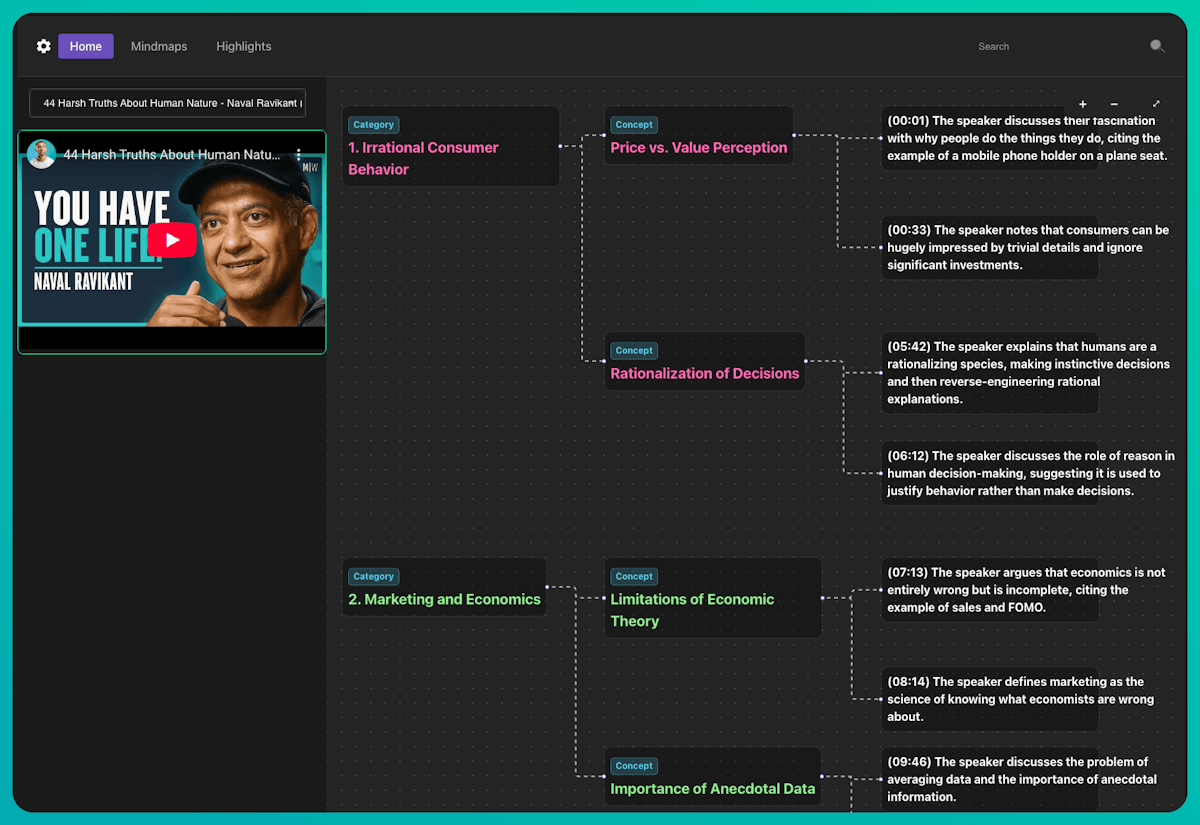
Insight Map generates a 3-level visual mindmap from any saved content — automatically, at save time.
The three levels:
- Root concept — the central topic or argument of the piece
- Main branches — the key themes, sections, or claims
- Sub-branches — specific insights, supporting evidence, and details
Every node is grounded to its source. That means:
- Click a node from a YouTube video → jumps to the exact timestamp
- Click a node from a PDF → jumps to the exact page
- Click a node from an article → highlights the original quote
You're not reading a summary someone else wrote. You're navigating the actual content — at the level of detail you need, without touching anything you don't.
How to open Insight Map
- Open any saved item from your Learning Feed or a Space
- Select the Insight Map view
- Browse the hierarchy — root concept at top, branches below
- Click any node to jump directly to the source
That's it. No setup, no tagging, no manual note-taking. The map is already there when you open the item.
Insight Map alongside Highlight Cards and Question Cards
Insight Map gives you structure. It's the skeleton of the content — what it covers and how the pieces fit together.
Use it alongside the other cards for full comprehension:
- Highlight Cards — the most important extracts, surfaced automatically
- Question Cards — what questions this content answers, and what it leaves open
Together, these three views mean you never need to consume the same piece of content from scratch again.
Who uses Insight Map
Knowledge workers building a research base across dozens of sources. Instead of re-reading everything when a topic comes up, they navigate to the node that matters.
Students and researchers working with dense PDFs and long lectures. Insight Map replaces the highlighter-and-notes ritual with a structured, clickable map.
Lifelong learners with a backlog of saved videos and articles. The map makes any piece of content immediately navigable — even if you saved it a year ago and barely remember it.
Frequently Asked Questions
What types of content does Insight Map support?
YouTube videos, articles (via URL), and PDFs. Insight Map works on all three content types and generates source-grounded nodes for each — timestamps for video, page numbers for PDF, and inline quotes for articles.
Does Insight Map replace reading or watching the content?
No — it replaces re-reading and re-watching. The first time through, consume it however you prefer. Insight Map is there when you come back and need to navigate, not consume from scratch.
How many levels does the mindmap have?
Three levels: root concept, main branches, and sub-branches. This mirrors how most structured content is organized — main argument, supporting themes, and specific evidence.
Can I edit the Insight Map?
Insight Map is AI-generated and read-only by design. It reflects the source content directly. For your own annotations and extracts, use Highlight Cards.
What's the difference between Insight Map and a summary?
A summary compresses content into a paragraph you read linearly. Insight Map preserves the structure and lets you navigate non-linearly — jump to the branch you care about, skip the rest.
Does Insight Map work on short content too?
Yes, though it's most valuable for longer, denser content — multi-hour videos, long-form articles, or research PDFs. For shorter pieces, Highlight Cards and Question Cards tend to be more useful entry points.
Is Insight Map available on mobile?
Yes, Insight Map is available across web and desktop in SaveForLater.ai.
The bottom line
Saving content is easy. Getting value from it later — that's the hard part. Insight Map closes that gap by giving every saved item a structure you can navigate from day one.
Open any video, article, or PDF. The map is already there.
Get started with SaveForLater.ai →
Related: Highlight Cards · Question Cards